Sunday, November 8, 2015

How to check Array contains an Item in JavaScript?

Hi,
 
Here is the JavaScript  code to check Array contains an item in JavaScript.
 
var vArrValues = ["1", "2", "3", "4"];

// Check Array Contains Values
Array.prototype.contains = function (element) {
     return this.indexOf(element) > -1;
};

function CheckArrayContaintsValue(vValue) {
    if (vArrValues.contains(vValue)) {
            return true;
    }
    else {
       return false;
     }
}

CheckArrayContaintsValue("1"); // Returns True
CheckArrayContaintsValue("5"); // Returns False
 
Hope this helps.
 
--
Happy Coding.
Gopinath

Copy/ Create Views in Dynamics CRM 2011/2013/2015

Hi,

Most of the times we get the requirement to create views as same as the existing views and some of the filter conditions and columns.

Creating views is always tedious job and time-consuming process. As we all know, Dynamics CRM is always smart.

We can quickly copy an existing view to use as a starting point for a new view. This can be a big time-saver if you have a complex view that you need to create a small variation of.

To do this,
1) Just navigate to the list of views for an entit
2) Open the view you want to copy
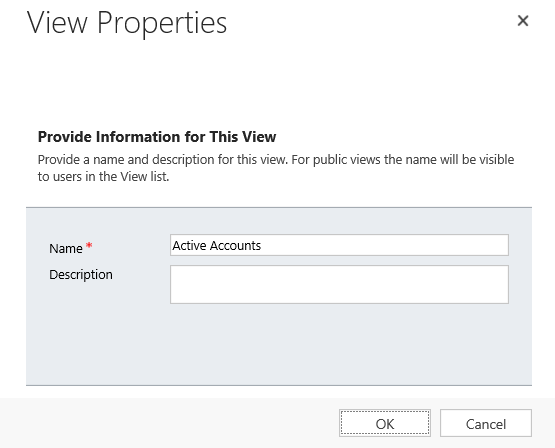
3) Click the Save As button in the menu bar.
 4) Enter a new name for the view and it will be saved as a copy of the original.


5) You will see a new view created.

Hope this helps.

--
Happy CRM'ing
Gopinath

Saturday, November 7, 2015

1:N and N:1 relationships in Dynamics CRM

There are the types of relationships that we will be creating most frequently in Dynamics CRM.
 
1:N - The relationship between Contact and Asset is a typical 1:N relationship. Each contact may have many different assets associated to them.
 
N:1 - If we see the same relationship from the Asset entity, then the relationship back to Contacts can be said to be N:1. In simple words, many assets are related back to a single contact.
 
For implementing above example in Dynamics CRM, we should create a Contact Look up attribute on Asset entity.
 
Hope this helps.
--
Happy CRM'ing

Gopinath

Lead and Opportunity in Dynamics CRM 2011/2013/2015

Hi,

Here are some basic things related to Lead and Opportunity in CRM.

Leads
Leads are records that you have not yet qualified as desirable prospects for your organization. For example, if someone visits your Web site and submits a “contact us” form, your organization may want to follow up and qualify them. Once qualified, a lead is converted into an account, a contact, and possibly an opportunity. Leads that are disqualified are kept in the database for reporting purposes but are otherwise hidden from standard views. Depending on your situation, you may find that your organization makes heavy usage of leads or does not need to use leads at all. Organizations that spend a lot of time trying to filter out unqualified leads (those that they do not wish to do business with) typically find that leads are an important part of CRM. Organizations that have a captive audience of qualified leads and customers (such as a public utility) may not need to use leads at all.

Opportunities
Opportunities are potential transactions that your organization may engage in with a targeted customer. They are linked to the customer (an account or contact) to which they are related.

Hope this helps.

--
Happy CRM'ing
Gopinath

Thursday, November 5, 2015

Retrieve Option Set text from CRM 2011/2013/2015 in JavaScript

Hi,
 
Today I got a requirement to write JavaScript code to get text of the option set value and perform some business validations.
 
Its really pretty simple to get the option set text from the particular entity and attribute.
 
We just need to add SDK.Metadata.js reference. This can found under (SDK\SampleCode\JS\SOAPForJScript\SOAPForJScript\Scripts) and use the below code.

function GetOptionSetText(EntityLogicalName, AttributeLogicalName) {
    SDK.Metadata.RetrieveAttribute(EntityLogicalName, AttributeLogicalName, "00000000-0000-0000-0000-000000000000", true,
       function (result) {
            for (var i = 0; i < result.OptionSet.Options.length; i++) {
                var text = result.OptionSet.Options[i].Label.LocalizedLabels[0].Label;
                var value = result.OptionSet.Options[i].Value;
            }
        },
        function (error) { }
    );
}

Hope this helps.

--
Happy CRM'ing
Gopinath

Wednesday, November 4, 2015

Type-Cast oData Service Datetime field in CRM 2011/2013/2015

Hi,

When you retrieve CRM date time values using oData Service from CRM, you will get the date in different format as below which we cannot set to Date field.
 
Here is the way to type cast it.
 
var vDate = jsonResult[0].new_date;
vDate = vDate.replace("/Date(", "");
vDate = vDate.replace(")/", "");
var dateValue = new Date(parseInt(vDate, 10));

Hope this helps.
 
--
Happy Coding

Gopinath

Get Difference between two dates in JavaScript

Hi,

Dealing with dates will always dicey. Most of the times when we calculate difference between two dates we don't consider a Daylight saving change.

In this case, the date on which day light saving change happens will have a duration in milliseconds which != 1000*60*60*24, so the typical calculation will fail.

A more accurate way to get the number of days between two JavaScript dates can be written as follows:

// date1 and date2 are javascript Date objects
function dateDiffInDays(date1, date2) {
    var vInt_MS_PER_DAY = 1000 * 60 * 60 * 24;
    // Discard the time and time-zone information.
    var utc1 = Date.UTC(date1.getFullYear(), date1.getMonth(), date1.getDate());
    var utc2 = Date.UTC(date2.getFullYear(), date2.getMonth(), date2.getDate());
    return Math.floor((utc2 - utc1) / vInt_MS_PER_DAY);
}

Hope this helps.

--
Happy Coding
Gopinath


Monday, November 2, 2015

Get Option Set String from CRM 2011/2013/2015 in C#

Hi,

Most of the times, CRM developer in CRM goes to check Option Set value only finds out the value as integer.

At times, we get a requirement to get string value associated with the integer.  For doing this, we write a metadata call and as we all know metadata calls are more time consuming.

As always, CRM is smart just we need to find the correct approach.

When we retrieve the entity, we can always the string of the option set by using the following line.

string strOptionSetText = objEntity.FormattedValues["<OptionSetSchemaName>"];
Hope this helps.
--
Happy CRM'ing

Gopinath 

How to check GUIDs are equal in JavaScript

Hi,

In CRM, at times we get requirement to check two GUID's are equal or not.

Here is the JavaScript code to check two GUID's are equal.

function GuidsAreEqual(guid1, guid2) {
    var isEqual = false;
    if (guid1 == null || guid2 == null) {
       isEqual = false;
    }
    else {
        isEqual = (guid1.replace(/[{}]/g, "").toLowerCase() == guid2.replace(/[{}]/g, "").toLowerCase());
    }
    return isEqual;
}
Hope this helps.

--
Happy CRM'ing

Gopinath

How to generate a random unique 5 digit number in C#

Hi,
 
Here is the way to generate 5 digit random unique number.
 
Random objRandom = new Random();
int intValue = objRandom.Next(10000, 99999);
 
The number 10000, 99999 specifies the range

For example - If you want generate 6 digit random number, just increase the range to 100000, 999999.
 
Hope this helps.
 
--
Happy Coding
Gopinath

Business Process Stage Change and Stage Select Events in CRM 2015

Hi,

Sometimes we get a requirement to do some operations on the business process stage change or on the select of the stage. This can be done by the following way.

We have two new events addOnStageChange and addOnStageSelected.

Just attach a function to theses event on the load of the form.

function onLoad() {
    Xrm.Page.data.process.addOnStageChange(onStageChangeEvent);
    Xrm.Page.data.process.addOnStageSelected(onStageSelectEvent);
}

// Stage Change Event
function onStageChangeEvent(eventArgs) {
    alert("I am Stage Change Event");
}

// Stage Select Event
function onStageSelectEvent(eventArgs) {
    alert("I am Stage Select Event");
}

Here is the output.


Hope this helps.

--
Happy CRM'ing

Gopinath

Saturday, October 31, 2015

Find users who are part of a team in CRM 2011/2013/2015

Hi,
 
Here is the advance find to find the users who are part of a team in CRM.
 
Hope this helps.
 
--
Happy CRM'ing
Gopinath

Code to check if the user is a team member in CRM 2011/2013/2015

Hi,
 
Today we got a requirement to check if the user is a member of particular team and do some operation based on that.
 
Here is the C# code to check the user is a team member of the team.
 
public static bool CheckTeamMember(Guid guidTeam, Guid guidUser, IOrganizationService iService)
{
        QueryExpression objQueryExp = new QueryExpression("team");
        objQueryExp.ColumnSet = new ColumnSet(true);
        objQueryExp.Criteria.AddCondition(new ConditionExpression("teamid", ConditionOperator.Equal, guidTeam));
        LinkEntity lnkEntity = objQueryExp.AddLink("teammembership", "teamid", "teamid");
        lnkEntity.LinkCriteria.AddCondition(new ConditionExpression("systemuserid", ConditionOperator.Equal, guidUser));
        EntityCollection entColResults = iService.RetrieveMultiple(objQueryExp);
        if (entColResults.Entities.Count > 0)
        {
             return true;
        }
        else
        {
             return false;
        }
}
 
Hope this helps.
 
--
Happy CRM'ing
Gopinath

Basic functions of Master, MSDB, Model and Tempdb databases in SQL Server

After a long time, I did open SQL Server Management Studio and connected to a database. Just remembered the basis which I read when I didn't my career.

Master
This database holds information for all databases located on the SQL Server instance and is the glue that holds the engine together. Because SQL Server cannot start without a functioning master database, you must administer this database with care.


Msdb
This database stores information regarding database backups, SQL Agent information, DTS packages, SQL Server jobs, and some replication information such as for log shipping.


Model
This database is essentially a template database used in the creation of any new user database created in the instance.


Tempdb
The tempdb holds temporary objects such as global and local temporary tables and stored procedures.


Hope this helps.
 
--
Cheers,

Gopinath

Thursday, October 29, 2015

Set Due Date by Considering Working Days in CRM

Hi,
 
Today we got a requirement to create a task where the due date of it next 2 working days from today.
Immediately, our minds thought very complex logic of having a custom entity and storing values etc to find working days logic..
 
After some search, we have designed a simple approach for it by using OOB Business closures Calendar.
 
Here is the procedure for it.
 
1) Go to Settings-> Business Closures
2) Create your holiday list here
3) Use the following code for getting date by considering the working days as a parameter.
 
public static DateTime GetDatePlusWorkingDays(IOrganizationService iService, int intDaysToAdd)
{
      // Get business closure calendar
      QueryExpression calenderQuery = new QueryExpression
      {
           EntityName = "calendar",
           ColumnSet = new ColumnSet(true),
           Criteria =
           {
               Conditions =
               {
                   new ConditionExpression("name", ConditionOperator.Equal, "Business Closure Calendar")
                }
           }
       };
       EntityCollection businessClosureCalender = iService.RetrieveMultiple(calenderQuery);
       // Advance start date by 1 day until required number of working days have been added
       DateTime requiredDate = DateTime.Now;
       // int daysToAdd = 3;
       while (intDaysToAdd > 0)
       {
           requiredDate = requiredDate.AddDays(1);
           if (isWorkingDay(businessClosureCalender, requiredDate)) intDaysToAdd--;
       }
       return requiredDate;
}

// Check whether a date/time is a working day or not
public static bool isWorkingDay(EntityCollection businessClosureCalender, DateTime time)
{
     // Check if date/time is a Saturday or Sunday
     if (time.DayOfWeek == DayOfWeek.Saturday || time.DayOfWeek == DayOfWeek.Sunday)
     {
           // Weekend = non-working day
           return false;
     }
     // Check if date/time falls within a Business Closure period
     if (businessClosureCalender.Entities.Count > 0)
     {
           EntityCollection businessClosureRules = (EntityCollection)businessClosureCalender.Entities[0].Attributes["calendarrules"];
           foreach (Entity rule in businessClosureRules.Entities)
           {
                if ((DateTime)rule.Attributes["effectiveintervalstart"] <= time && (DateTime)rule.Attributes["effectiveintervalend"] > time)
                {
                     // Business closure= non-working day
                     return false;
                }
           }
      }
      // Date/Time is not a weekend or within a business closure period, so it is a working day
    return true;
}
 
Hope this helps.
 
--
Happy CRM'ing
Gopinath