Monday, 12 October 2015

Error processing request stream. The request should be a valid top-level resource object CRM and oData

Hi,

Today I got the below error when I was trying to update Product Properties using Java Script.

Error processing request stream. The request should be a valid top-level resource object

The code is as follows.

function updateProductProperties() {
   var vUpdateProperty = {};
   vUpdateProperty.ValueString = "testing";
   vUpdateProperty.DynamicPropertyId = "guid";
   vUpdateProperty.RegardingObjectId = "guid"
   var vdynamicProductPropertyId = "<DynamicPropertyInstanceGUID>";
   SDK.REST.updateRecord(vdynamicProductPropertyId, vUpdateProperty, "DynamicPropertyInstance", function () { alert("The dynamic property instance record changes were saved"); }, function (error) { alert(error.message); });
}

After some search I figured out the error was because of type mismatch. When you get this type of error check the fields are mapped to correct data type references. In my case, I need to use Entity Reference Object where I used normal string.

Here is the correct code.

function updateProductProperties() {
    var vUpdateProperty = {};
    vUpdateProperty.ValueString = "testing";
    vUpdateProperty.DynamicPropertyId = { Id: "", LogicalName: "dynamicproperty" };
    vUpdateProperty.RegardingObjectId = { Id: "", LogicalName: "opportunityproduct" };
    var vdynamicProductPropertyId = "<DynamicPropertyInstanceGUID>";
    SDK.REST.updateRecord(vdynamicProductPropertyId, vUpdateProperty, "DynamicPropertyInstance", function () { alert("The dynamic property instance record changes were saved"); }, function (error) { alert(error.message); });
}

Hope this helps.

--
Happy CRM'ing
Gopinath

Update Dynamic Property Instance using JavaScript in CRM 2015

Hi,
 
Today we got the requirement to update Dynamic Product Properties of an Opportunity Product using JavaScript.
 
Here is the JavaScript code for doing it.
 
function updateProductProperties() {
   var vUpdateProperty = {};
   vUpdateProperty.ValueString = "testing";
   vUpdateProperty.DynamicPropertyId = { Id: "", LogicalName: "dynamicproperty" };
   vUpdateProperty.RegardingObjectId = { Id: "", LogicalName: "opportunityproduct" };
   var vdynamicProductPropertyId = "<DynamicPropertyInstanceGUID>";
   SDK.REST.updateRecord(vdynamicProductPropertyId, vUpdateProperty, "DynamicPropertyInstance", function () { alert("The dynamic property instance record changes were saved"); }, function (error) { alert(error.message); });
}

Refer this link for Updating Product Properties using C#

Hope this helps.
 
--
Happy CRM'ing
Gopinath

Wednesday, 7 October 2015

Create a folder in SharePoint from CRM Plugin

Hi,
 
Today we got requirement to create a folder automatically in Share Point when a record is created in CRM. Normally SharePoint document location is created when we click on Documents on the left navigation pane for the record.
 
It can be done very easily by using the plugin but we should register the plugin None mode. It's not applicable for Online CRM.
 
Here is the code. 

public void Execute(IServiceProvider serviceProvider)
{
      IPluginExecutionContext iContext = (IPluginExecutionContext)serviceProvider.GetService(typeof(IPluginExecutionContext));
      IOrganizationServiceFactory iServFactory = (IOrganizationServiceFactory)serviceProvider.GetService(typeof(IOrganizationServiceFactory));
      IOrganizationService iService = iServFactory.CreateOrganizationService(iContext.UserId);
      ITracingService tracingService = (ITracingService)serviceProvider.GetService(typeof(ITracingService));
      if (iContext.InputParameters.Contains("Target") && iContext.InputParameters["Target"] is Entity && iContext.MessageName.ToLower() == "create")
      {
           Entity entAccount = (Entity)iContext.InputParameters["Target"];
           string strSharePointURL = CreateFolderInSharePoint(iService, entAccount.Attributes["name"].ToString(), entAccount.Id);
      }
}

public string CreateFolderInSharePoint(IOrganizationService coreCrmService, string strAccountName, Guid guidAccountId)
{
      string strDocLibraryUrl = "http://SharePointURL";
      string strApplicationFolderUrl = strDocLibraryUrl + "/" + "account";
      string strFolderUrl = strApplicationFolderUrl + "/" + strAccountName;
      // Create folder and subfolder inside SharePoint site
      CreateFolderStructure(strApplicationFolderUrl, strFolderUrl);
      // create and associate the url of the folder to SharePointDocumentLocation and the crm record.
      CreateAndAssociateSharePointDocumentLocation(coreCrmService, guidAccountId, "account", strFolderUrl);
      return strFolderUrl;
}

// Check and create folder.
private bool CreateFolderStructure(string strSharePointDocumentUrl, string strFolderUrl)
{
     if (CreateFolder(strSharePointDocumentUrl))
     {
          return CreateFolder(strFolderUrl);
     }
     return false;
}

// Create Folder
private bool CreateFolder(string strFolderUrl)
{
     try
     {
          WebRequest request = WebRequest.Create(strFolderUrl);
          request.UseDefaultCredentials = true;
          request.Method = "MKCOL";
          WebResponse response = request.GetResponse();
          response.Close();
     }
     catch (Exception ex)
     {
           // throw ex;
     }
     return true;
}

// Create a Document Location record in CRM by associating Share Point URL.
public static bool CreateAndAssociateSharePointDocumentLocation(IOrganizationService iService, Guid guidIncidentId, string strAccount, string strSharePointDocumentUrl)
{
      Entity entSharePointDocumentLocation = new Entity("sharepointdocumentlocation");
      entSharePointDocumentLocation.Attributes["name"] = "SharePoint Document Location for " + strAccount;
      entSharePointDocumentLocation.Attributes["description"] = "SharePoint Document Location created for storing documents related to account";
      entSharePointDocumentLocation.Attributes["absoluteurl"] = strSharePointDocumentUrl;
      entSharePointDocumentLocation.Attributes["regardingobjectid"] = new EntityReference("account", guidIncidentId);
      iService.Create(entSharePointDocumentLocation);
      return true;
}
 
Hope this helps.
 
--
Happy CRM'ing
Gopinath

Sunday, 4 October 2015

Trigger a plugin when a case (incident) is resolved in CRM

Hi,

To trigger a plugin when an incident is resolved we need to register the plugin on 'Close' message for the incident entity.

And in the input parameters of the context we need to check for IncidentResolution.

You can get the case id from Incident Resolution entity by using the following code.

IPluginExecutionContext context = (IPluginExecutionContext)serviceProvider.GetService(typeof(IPluginExecutionContext));
IOrganizationServiceFactory factory = (IOrganizationServiceFactory)serviceProvider.GetService(typeof(IOrganizationServiceFactory));
IOrganizationService service = factory.CreateOrganizationService(context.UserId);
if (context.InputParameters.Contains("IncidentResolution"))
{
     Entity incidentResolution = (Entity)context.InputParameters["IncidentResolution"];
     Guid relatedIncidentGuid = ((EntityReference)incidentResolution.Attributes["incidentid"]).Id;
}

IncidentResolution is a special entity that holds the information about the incident record that is being closed.

Hope this helps.

--
Happy CRM'ing
Gopinath

Update records in CRM using Dialogs

Hi,
 
Updating records from Dialogs can be done very easily in CRM.
 
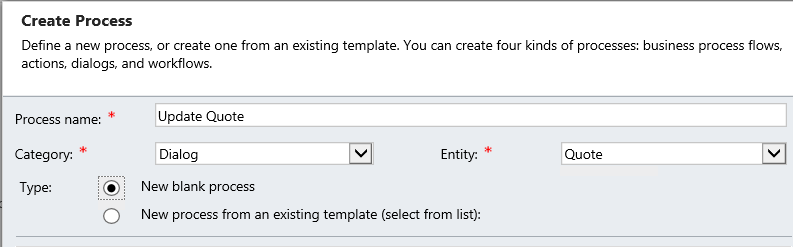
1) Create a new dialog.
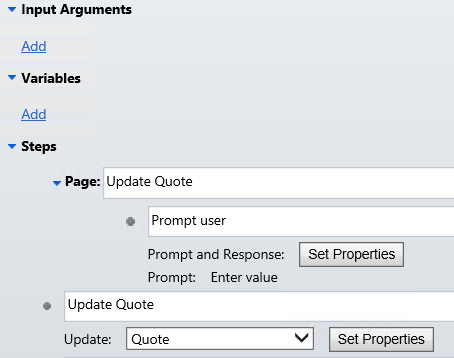
2) Click on the row below the 'Steps' node and choose 'Page' from the 'Add Steps' button.
3) Select the row down and click on Add Step. Select 'Prompt and Response' and click on Properties.
4) On the Define Prompt and Response window, you can give your instructions and data type, response type and default value if you want to auto-populate anything.
5) Click on 'Save and Close'.
6) Click on Add Step and select Update Record.
7) Click on View Properties and select the field which you want to update.
8) Get the value from Assistant pane, click the 'Look For' combo box and down near the bottom under the 'Local Values', you should see an item for selection that matches the description you gave the prompt step.
9) Click on 'Save and Close' and activate the dialog.
10) Open the record for which you want to run the dialog and click on 'Start Dialog' button on the ribbon. This will open a dialog requesting the details.
 
Hope this helps.
 
--
Happy CRM'ing
Gopinath

Get OptionSet Values from CRM Database - StringMap in CRM

Hi,
 
At times we get requirement to query and get option set items from CRM and show them in a report or in some custom application. Then we query to SQL MSCRM Organization database to get the pick list values but we get values as 0, 1, 2 and 1000001 etc.. but where we need to show the text values.
 
To retrieve the associated descriptive information, we need ajoin to the StringMapBase table.
 
SELECT
       ATTRIBUTENAME,
       ATTRIBUTEVALUE,
       VALUE
FROM
       STRINGMAPBASE
WHERE
       LANGID = 1033 AND ATTRIBUTENAME = 'statecode' 
 
This works absolutely fine for the unique optionsets but not for StateCode. For statecode, we need to have a condition on objecttypecode. Here is the query to get the objecttypecode of the entity.
 
SELECT
       OBJECTTYPECODE,
       ENTITYID,
       NAME
FROM
       METADATASCHEMA.ENTITY
WHERE
       NAME = 'Opportunity' AND OVERWRITETIME = '1900-01-01' 
The reason for date filter is CRM maintains a history of changes to the entities. If a customization solution has been applied to your CRM instance, more than one record will exist for some entities.

Here is the query after joining.

SELECT
       strMap.ATTRIBUTENAME,
       strMap.ATTRIBUTEVALUE,
       strMap.VALUE
FROM
       STRINGMAPBASE strMap
INNER JOIN
       METADATASCHEMA.ENTITY ent ON strMap.OBJECTTYPECODE = ent.OBJECTTYPECODE
WHERE
       ent.NAME = 'Opportunity'
       AND strMap.ATTRIBUTENAME = 'statecode'
       AND ent.OVERWRITETIME = '1900-01-01'

The LangId filter in all the queries is simply filtering for the English language – this is needed for multi-lingual systems.
 
Hope this helps.
 
--
Happy CRM'ing
Gopinath

Friday, 2 October 2015

Aggregate FetchXML Queries in CRM 2011/2013/2015

Hi,

Today I got a requirement to calculate the sum of the invoice records in CRM.

Normally, we can do retrieve all records from CRM and loop through each record and calculate the sum of the total amount.

Here is the way to do using Fetch XML where looping is not required.

string strFetchXML = @"<fetch distinct='false' mapping='logical' output-format='xml-platform' aggregate='true'>
   <entity name='invoice'>
       <attribute name='totalamount' aggregate='sum' alias='inv.totalamount'/>
       <filter type='and'>
           <condition attribute='statecode' operator='eq' value='0'/>
       </filter>
    </entity>
</fetch>";
EntityCollection entInvColl = iService.RetrieveMultiple(new FetchExpression(strFetchXML));
Entity entInvoice = entInvColl.Entities[0];
AliasedValue avTotalAmount = (AliasedValue)entInvoice.Attributes["inv.totalamount"];
Money mnyValue = (Money)(avTotalAmount.Value);
decimal decValue = mnyValue.Value;

Hope this helps

--
Happy CRM'ing

Gopinath

Tuesday, 29 September 2015

FormType (Create and Update) based Business Rules in CRM 2015

Hi,

Today I was writing some JavaScript to hide some of the controls and got a doubt that whether we can do the same using Business Rules.

The answer is Yes, we can do. Just check the condition CreatedOn contains data and write your actions.

Note: Make sure you have added CreatedOn field on the form. If you are not using it, hide it form the form. Business rule requires the field to be there on the form.

Hope this helps.

--
Happy CRM'ing
Gopinath

Basic Security Role Privilege for Data Import in CRM

Hi,

Today, one of the users in CRM was unable to import data in CRM. We did check the security role and found that the user doesn't have correct privilege for importing the data.

Here are the basic security role privilege for data import
 
  • Data Import – Except Assign and share we need all the rest user level 
  • Data Map – Except Assign and share we need all the rest user level 
  • Import source file –Except Assign, share and Delete we need all the rest user level 
  • Web Wizard - Read 
  • Web Wizard Access Privilege - Read 
  • Wizard Page - Read

Hope this helps.
 --
Happy CRM'ing
Gopinath 

Wednesday, 23 September 2015

Scope of the Workflow in CRM

Hi,
 
Today, I got a question from one of the fresher who started working in CRM on the Scope of the workflow in CRM.
 
User - the Workflow will exclusively run on records with the same owner as the Workflow.

Business Unit- the Workflow will exclusively run on records owned by any user in the same Business Unit as the owner of the Workflow.

Parent: Child Business Units- the Workflow will exclusively run on records owned by any user in the same Business Unit or Child Business Units.

Organization - the Workflow will run on records owned by any user.

Hope this helps.

--
Happy CRM'ing
Gopinath