Monday, August 31, 2020

Convert JSON to Object using C# Code

Hi Everyone,

Many times we get a requirement to convert JSON string to C# Object and most of the times, we go with Newtonsoft Dll. In Dynamics 365 Plugins, we all know it is not recommended to use Newtonsoft as we have to use ILMerge to merge the dlls and deploy.

Here is the easy way to convert JSON string to C# object without using external references.

You have to add below references from .net framework to your project.

using System.Runtime.Serialization;
using System.Runtime.Serialization.Json;
using System.IO;

        [DataContract]
        public class MyClass
        {  
            [DataMember]
            public string Firstname { get; set; }
            [DataMember]
            public string Lastname { get; set; }
        }

        static void Main(string[] args)
        {
            // string strJSONstring = Console.ReadLine();
            string strJSON = "{\"Firstname\":\"Dynamics 365\", \"Lastname\":\"Customer Engagement\"}";
            MyClass objMyClass = null;
            using (var stream = new MemoryStream(Encoding.Unicode.GetBytes(strJSON)))
            {
                DataContractJsonSerializer deSerializer = new DataContractJsonSerializer(typeof(MyClass));
                objMyClass = (MyClass)deSerializer.ReadObject(stream);
            }
        }

Hope this helps.

--
Happy Coding
Gopinath.

Sunday, August 30, 2020

Find the current opened file in the solution explorer - Visual Studio tips

Hi Everyone,

Today I was working on some project and I have added a new file in the project, we have a habit of refreshing Solution Explorer when we do this. 

Instead of clicking on Refresh button on Solution Explorer, it happened to click the button which is next to it. Trust me, I have never used and don't even know anything about that till I clicked it.

I feel, it is a good feature that every developer must know. When we click on this, it automatically selects the file which is currently opened in Canvas. Check the below video to understand more.


This has raised a thought in my mind, why don't Visual studio automatically select the item which is opened instead of giving a button to click. After a quick search on this came to know that there is setting for this.

Visual Studio  --> Tools  --> Options  --> Projects and Solutions  --> General
Check "Track Active Item in Solution Explorer" which will automatically selects the current opened file in Solution Explorer.

Hope this helps.

--
Happy Coding,
Gopinath.

Programmatically Recalculating Rollup fields using C# in Dynamics 365/CRM

Hi Everyone,

Today I got an requirement to send some data to external system and they were looking for real time data. When I did the fields found some Rollup fields and we all know that Rollup fields are asynchronous in nature and it is managed by Recurring System Jobs.

I was kind of stuck, did a little search and understood that there is a SDK message which we can use for recalculating. Here is the code for the same.


CalculateRollupFieldRequest rollupRequest = new CalculateRollupFieldRequest
            {
                Target = new EntityReference("account", new Guid("475b158c-541c-e511-80d3-3863bb347ba8")),
                FieldName = "new_rollupfromchild"
            };


CalculateRollupFieldResponse response = CalculateRollupFieldResponse)crmService.Execute(rollupRequest);

Hope this helps.

--
Happy 365'ing
Gopinath.

#Error on Preview - SSRS Report new field

Hi Everyone,

Today I was working on the report and the requirement was to add one more field in the existing table and show it. I have modified the data source accordingly and mapped the field in the table of SSRS report. When I tried to preview the same, it was showing the value as #Error.

I was little surprised and checked the mapping and data source. Everything seems to be correct and somehow the report is not showing the fields value in preview mode. 

After some search came to know that it seems to a bug/by design in SSRS. For every report, you will see a .data file in your report project and it is basically caching the data. Just deleting that file and running the report again fixed the issue.

You can also just do refresh in the preview by the clicking on the button highlighted below.

Hope this helps.

--
Happy Reporting
Gopinath

List Records Output not showing in Power Automate/Microsoft Flow

Hi Everyone,

Today I have configured a CDS List Records step in flow to retrieve some records and I have to parse them and do some operation. We all know that for Parse JSON step, we have to give schema. In these type of cases, usually we run the flow first till List Records step and copy the output from that step and give copied output to generate schema in Parse JSON step.

When I was doing the same, unfortunately the list records steps is not showing output and not giving any option to download the result as well. I was kind of stuck with that and by doing quick search came to know that we can Compose Step  give the output the List Records step to Compose step so that we can see the result and use it for generating schema.


Hope this helps

--
Happy 365'ing
Gopinath

Get a single/first record from CDS/Dynamics 365 List Records action step in Power Automate/Microsoft Flow


Hi Everyone,

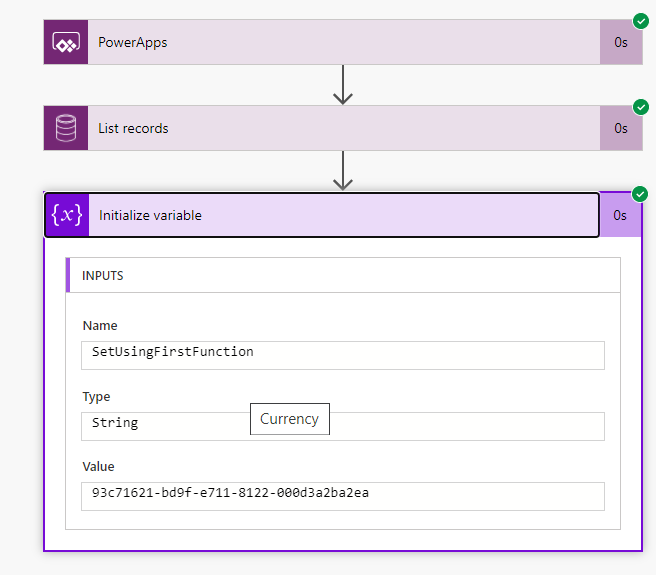
Today I was working on Microsoft Flow and I have List Records step configured in the flow. As per the requirement, I know that the result of the List Records step would be one record or empty. We all know that to get the data from List Record, normally go with Apply to each step as I already know that the output count of records would not be more than 1 taken below approach.

List Records Step  -->  Take the required values using First function.

first(body('List_records')?['value'])?['accountid']

This returns empty string if the count is 0 else the value.


Hope this helps

--
Happy 365'ing
Gopinath

Saturday, August 15, 2020

Open the required App in much more easier and faster - Dynamics 365 CE 2020 Release Wave 2

Hi Everyone,

Today I was exploring the latest features on the Dynamics 365 CE 2020 Release Wave 2 and I have opened Sales Hub, after sometime I would like to open Customer Service Hub and to my surprise I was not able to find the Icon (check the below screenshot) that used to show the Apps in the system.

After some search, it was replaced with the Hyperlink on the App Names itself.


Hope this helps.

--
Happy 365'ing
Gopinath.

Friday, August 14, 2020

Get InitialValue of a field in JavaScript - in Dynamics 365 CE

Hi Everyone,

Today I was going through Client API from Microsoft Docs and found getInitialValue reference. I haven't used it anytime and explored little bit. 

Many times we get the requirement to compare the field values on the Save with the values that were populated on the load and to achieve this, normally we use declare a global variable in JavaScript and set the variable to the value of the field on the Load event and use it on Save for comparing. We can say good bye to these kind of logics and use getInitialValue() to get the value when the form is opened.

Here is the syntax for the same.

formContext.getAttribute(<attributename>).getInitialValue()

Note: 
1) This method works for only Boolean, OptionSet or MultiSelectOptionSet attributes. 
2) Once the record is saved, getInitialValue holds the latest value whatever that was changed by the user.

Hope this helps.

--
Happy 365'ing
Gopinath.

Thursday, August 6, 2020

Get Security Roles of logged-in/current user in JavaScript - Dynamics 365 CE

Hi Everyone,

Let's say bye bye to all the code that we used to write for getting Security Roles of the logged in User. 

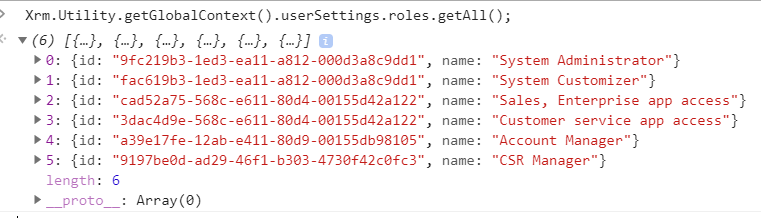
Here is the single line of the JavaScript code which gets all the Security Roles GUIDs along with names.

Xrm.Utility.getGlobalContext().userSettings.roles.getAll();

Security roles associated with the user.

Security roles associated with the Team where user is a part of the Team.


When we run the code, here is the output.


Hope this helps.

--
Happy 365'ing
Gopinath.

Wednesday, August 5, 2020

Enable 2020 Release Wave 2 – Dynamics 365

Hi Everyone,

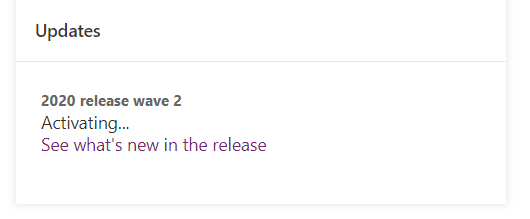
Release Wave 2 Early access has been released and here are the steps to enable it on your instance

Logon to Admin Portal

Open the environment which you would like to enable Early access and click on Manage.

You will see the screen as below and click on Update now for getting Release Wave 2 Features to the instance.

You will be asked to enter Environment's name for the verification.

After verification, the Update process starts and it will take some time.

Hope this helps.

--
Happy 365'ing
Gopinath.

Monday, August 3, 2020

Microsoft Dataflex, Microsoft Dataflex Pro versus Common Data Service

Hi Everyone,

Would like to put this post simple and short. We all know the recent announcements from Microsoft on Dataflex. I was talking to one of my friends things were not much clear.

There are only two things to understand

1) Microsoft Dataflex Pro  -  Common Data Service would be renamed to Microsoft Dataflex Pro.
2) Microsoft Dataflex  -  a low-code data platform for Teams which is build on top of Common Data Service (Microsoft Dataflex Pro as per point 1).

Read more from here

I am sure this will have a ripple effect on multiple things but for now we have to wait for more announcements to come.

--
Happy 365'ing
Gopinath

Tuesday, July 21, 2020

Monitor for Model-Driven Apps - Power Platform

Hi Everyone,

It's time to say bye-bye to ask the Users to send fiddler traces as we can monitor every thing from our machine and analyze what exactly we need using Monitor.

Monitor provides you all client-side network of the app on which you can start analysis on the same. I think, it is most useful for the Microsoft Support Team and Product Team as they need the traces from the users to understand the issues and they normally guide with the steps that are needed to log the traces using Fiddler. Now, they can say bye-bye to those and just pass on the URL to the join the monitor debug session and trace everything. However, it would be useful for Technical Consultants as well to understand what is going wrong with the Performance, Script Errors, Form Events etc...

Let's see how it works.

Select the Model-driven app and right click on it, you will see an option as Monitor. 
A new tab will open upon clicking on Monitor button with the button as below.
Hit on Play model-driven app and it opens the App asking you to join the monitor session. If you want, you can join or we can copy the URL and give it to the user to open and perform the actions which they would like to do.
Once the Users join the session, navigate and perform actions whatever you want, you will see the complete traffic from the app is captured in the Monitor window.

As of now, the following events are supported.
  • KPI for page loads, command executions, and other major events
  • Network request details
  • Warnings for synchronous XHR’s
  • Custom script errors (e.g. onload, ribbon rule evaluation)
  • Form execution event details (e.g. onload, onchange)
  • Form visibility reasons for controls and related menu items
  • Power BI control failure and performance events

Refer PowerApps blog post for more information.

Hope this helps.

--
Happy 365'ing
Gopinath.

Monday, July 20, 2020

Plug-in Trace Logs not generating in Dynamics 365 CE On Premise

Hi Everyone,

I have started working on On Premise after so many years and I have to understand one of the plugin that was not working in some scenarios. I have written good traces to understand the logic and deployed the plugin.

To my surprise, while testing no plugin trace logs were generating. I was little surprised for sometime and after checking the things slowly came to know that the Plugin Assembly was deployed on None mode(Not in sandbox mode).

I have seen community discussion where people were saying the Plugin Trace Logs are not getting generated under None mode. Hope Microsoft will fix it soon.

https://community.dynamics.com/crm/f/microsoft-dynamics-crm-forum/189346/plugin-trace-log-not-working-on-dynamics-crm-2016-on-premise

For the time being, I have registered the plugin under Sandbox to get the trace.

Hope this helps.

--
Happy 365'ing
Gopinath.

Azure Function URL not working in New Portal

Hi Everyone,

The other day, I was asked by my Test Team to give them an URL to test a Timer Azure Function that triggers on a weekly basis. Unfortunately, we cannot wait for a week to trigger and hence we have changed that to HTTP Trigger Function and given the URL to the Test Team so that they can hit and run on demand.

Immediately got the response from QA Team saying that the URL provided is not working.
Up on investigation, the URL looked like the one in below image with "/api" in the URL but the same URL was populating without "/api" when we browsed the same using Azure Classic Portal.


When we tried the second URL that was without "/api", it was working as expected.
It could be an error on New Azure Portal as the same is working from Azure Classic Portal. Hope it will get fixed in near future.


Hope this helps.

--
Happy Coding
Gopinath.

Assembly must be registered in isolation - Dynamics 365 On Premise

Hi Everyone,

Today I was working on on-premise system after so many years and as per the requirement I need to update the one of the step from Async to Sync and when I tried doing that, was continuously getting error saying "Assembly must be registered in isolation."

Later I found that that Assembly was registered in "None" mode (Not in Sandbox mode) and the User with which I am trying to update the step doesn't have Deployment Administrator Role.

After adding the User to the Deployment Administrator role via Deployment Manager, I was able to update the step.

Hope this helps.

--
Happy 365'ing
Gopinath.

Sunday, July 19, 2020

Coalesce in Power apps - Power Platform

Hi Everyone,

As we all know how we Coalesce() function in SQL, it returns the first non-null value in a list.

For example : If we run the below query, will get the results as StatureStack.com

SELECT COALESCE(NULL, NULL, NULL, 'StatureStack.com', NULL, 'mscrmtechie.blogspot.com');

In simple words, it just returns whatever the first non-null value.

In the same way, we can use Coalecse function in Power Apps formulas as well. Today, I have two variables which has been set from different logic and I had to write the formula to get the not null value between two of them. I used below formula to get the not null value between two variables.

Coalesce(variable1, variable2, ...)


Here is more information from Microsoft Docs

Hope this helps.

--
Happy 365'ing
Gopinath.

Call Power Automate or Microsoft Flow from JavaScript - Dynamics 365 CE

Hi Everyone,

We all know how Power Automate or Microsoft Flows are changing the way we design the things in Dynamics 365 CE. Recently, we got a requirement to call Microsoft Flow from a button click on Dynamics 365. Here is the way we did using JavaScript.

Let's create a flow as below.

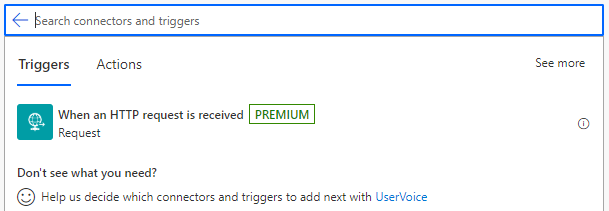
1) Take the trigger as HTTP Request received

2) Generate Schema accordingly to your input, I just have AccountID as an Input so taken JSON as below to generate schema and declare the method as POST.
{"AccountId": "abc"}

3) I just added one step of Variable as once the flows is triggered from the JavaScript, we can add the steps as per our requirement.

4) Save the flow and get the URL from HTTP Trigger (first step)

5) Here is the JavaScript code for calling flow.
function callFlowFromJavaScript() {
    var flowUrl = "FLOW URL";
    var input = JSON.stringify({
        "AccountId": "475b158c-541c-e511-80d3-3863bb347ba8"
    });
    var req = new XMLHttpRequest();
    req.open("POST", flowUrl, true);
    req.setRequestHeader('Content-Type', 'application/json');
    req.send(input);

}
To Configure Flow URL in a best way, you can read this Post.

Hope this helps.

--
Happy 365'ing
Gopinath.

Friday, July 17, 2020

Delete Change History button on Audit History - Dynamics 365 CE

Hi Everyone,

I was going through Audit History of a record to understand one of the bugs in my project. I have never seen Audit History in the recent times and I was little surprised to see a button as Delete Change History on top of the grid.

With the help this button, we can delete Audit history record by selecting a record by record. However, we might not want to give this permission to all the users in the system. And yes, we have a Privilege that we can remove so that users will not see the button.


Delete Audit Record Change History under Core Records  - Miscellaneous Privileges.

Hope this helps.

--
Happy 365'ing
Gopinath.

Canvas App showing loading icon on Dynamics 365 CE forms - Power Platform

Hi Everyone,

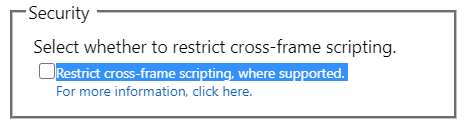
Today I was working on simple Canvas App and I have to show it on Model Driven Form on Dynamics 365 CE. I have published the Canvas App, copied the URL and did set to the IFrame on the form. Here is the configuration of the same.

I have saved the Form, Published and navigated to the Account page. To my surprise, it started showing only loading icon.

I was thinking something going at the Canvas App side but when I play, it is working fine. Came to the conclusion that certainly some thing from Dynamics side is blocking the content. And finally, it is Cross-frame Script which is blocking the content. After un-checking "Restrict cross-frame scripting, where supported. " checkbox everything started working.

Hope this helps.

--
Happy 365'ing
Gopinath.
Set Canvas App URL on Dynamics 365 CE - Power Platform

Hi Everyone,

Today I was talking to one my friends on the deployment of Canvas Apps that were configured as an IFrame on Model Driven Forms of Dynamics 365. The problem with this is, every time deployment happens the URL would be overridden and we have to manually open the properties of IFrame to set it to the right one.

We can write JavaScript to retrieve the URL  from some configuration/setting entity but every time, the call would be executed which we don't want. Here comes our friend Session Storage to help use.

We have added the piece of code to set the URL that is retrieved as Session Storage item and using it to setSrc instead of retrieving Settings/Configuration record every time. In fact, this solution all configurations whatever we are retrieving, we can use SessionStorage or LocalStorage based on the scenario which will eventually reduces the calls from client side and hence improves the performance. 

The only you should remember is to use Unique Name for the session variable, I normally use combination of OrganizationID and Configuration name.

Here is the code for your reference. First checking for the value in the Session Storage and if it contains value, taking it from there otherwise retrieve it and set to IFrame src as well as SessionStorage item with unique name to use next time.


function setCanvasAppsURL(executionContext, controlName, ConfigName) {
    var organizationSettings = Xrm.Utility.getGlobalContext().organizationSettings;
    var formContext = executionContext.getFormContext();
    var sessionVariable = organizationSettings.organizationId + ConfigName;
    var sessionVariableValue = sessionStorage.getItem(sessionVariable);
    var url = null;
    if (ConfigName != null && sessionVariableValue == null) {
        ///Get config value from configuration
        var globalContext = Xrm.Utility.getGlobalContext();
        var parameters = {};
        parameters.ConfigName = ConfigName;
        var req = new XMLHttpRequest();
        req.open("POST", globalContext.getClientUrl() + "/api/data/v9.1/SettingsEntity", true);
        req.setRequestHeader("Accept", "application/json");
        req.setRequestHeader("Content-Type", "application/json; charset=utf-8");
        req.setRequestHeader("OData-MaxVersion", "4.0");
        req.setRequestHeader("OData-Version", "4.0");
        req.onreadystatechange = function () {
            if (this.readyState == 4) {
                req.onreadystatechange = null;
                if (this.status == 200 || this.status == 204) {
                    if (JSON.parse(this.response).ConfigKey != null) {
                        url = JSON.parse(this.response).ConfigKey;
                        if (url != null) {
                            if (formContext.getControl(controlName) != null && formContext.getControl(controlName) != undefined) {
                                formContext.getControl(controlName).setSrc(url);
                                sessionStorage.setItem(sessionVariable, url);
                            }
                        }
                    } else {
                        console.log("Error");
                        Xrm.Utility.closeProgressIndicator();
                        var alertStrings = {
                            confirmButtonLabel: "Ok", text: "Error : " + JSON.parse(this.response).error.message
                        };
                        Xrm.Navigation.openAlertDialog(alertStrings);
                    }
                }
            }
        };
        req.send(JSON.stringify(parameters));
    }
    else
    {
        formContext.getControl(controlName).setSrc(sessionVariableValue);
    }

}

Hope this helps.

--
Happy 365'ing
Gopinath