Showing posts with label CRM 2015. Show all posts

Saturday, 30 January 2016

This bundle can't be published because it has too many properties. A bundle in your organization can't have more than 50 properties

Hi,

Today I was working with Product Configuration in CRM. We have created properties under family and the same family as parent for creating bundles. When we publish the bundle, we have received the below exception with the following message.

"This bundle can't be published because it has too many properties. A bundle in your organization can't have more than 50 properties."


This limit can be increased in System Settings.

Open System Settings --> Sales

Hope this helps.

--
Happy CRM'ing

Gopinath

Saturday, 9 January 2016

Changing security attributes is not allowed in stage 20 plugins

Hi,

Recently we were working on setting Owner of the record in the Pre-Create of the plugin based on our business rules. When we were testing we got the below message. I remember that we did the same in CRM 2013 which used to work properly, some how it is not working in CRM 2015 RTM.

Changing security attributes is not allowed in stage 20 plugins

Moved the code to trigger on Post-Create operation and written a code for assigning a record.

Hope this helps.

--
Happy CRM'ing

Gopinath

Tuesday, 8 December 2015

How to check whether the OpportunityProduct/QuoteProduct/OrderProduct is a bundle, product or bundled product in CRM

Hi,

Today I got a requirement to check the type of the product that is going to add to the opportunity and do some operation based on it.

This can be easily done by referring Product Type field of Opportunity Product /Quote Product/ Order Product. It is an Option Set with the below options.

ItemValue
Product1
Bundle2
Required Bundle Product3
Option Bundle Product4

Required and Optional refers to the Required field on Bundle Product.

Hope this helps.

--
Happy CRM'ing
Gopinath

Tuesday, 1 December 2015

Arabic Language Pack For Microsoft Dynamics CRM 2015

Hi,

I am working on Saudi Country CRM project. As their language is Arabic, they wanted to see CRM in Arabic language.

I thought, it would be damn easy to get the language pack and install it. But unfortunately, I could not find the Arabic language pack.


Don't waste your time like me, here is the direct link to get Arabic Language Pack.

https://www.microsoft.com/ar-sa/download/details.aspx?id=45014

Hope this helps.

--
Happy CRM'ing

Gopinath

Thursday, 12 November 2015

Retrieve Product Properties using JavaScript in CRM 2015

Hi,

Today we got a requirement to show Product Properties related to Opportunity Product in a HTML Webresource.

Here is the JavaScript code to read Product Properties.


  function getProperties() {
            var jsonResult = null;
            var ODATA_ENDPOINT = "/XRMServices/2011/OrganizationData.svc";
            var retrieveRecordsReq = new XMLHttpRequest();
            var oDataPath = "";
            var entityName = "DynamicPropertyInstance";
            var entityNameField = "*";
            oDataPath = Xrm.Page.context.getClientUrl() + ODATA_ENDPOINT + "/" + entityName + "Set?$select=*&$filter=RegardingObjectId/Id eq guid'" + vOpportunityProductId + "'";
            retrieveRecordsReq.open('GET', oDataPath, false);
            retrieveRecordsReq.setRequestHeader("Accept", "application/json");
            retrieveRecordsReq.setRequestHeader("Content-Type", "application/json; charset=utf-8")
            retrieveRecordsReq.send(null);
            var retrievedData = JSON.parse(retrieveRecordsReq.responseText).d;
            if (retrievedData != null && retrievedData != undefined && retrievedData.results != null) {
                jsonResult = retrievedData.results;
            }
             return jsonResult;
        }
Hope this helps.

--

Happy CRM'ing
Gopinath

Monday, 2 November 2015

Business Process Stage Change and Stage Select Events in CRM 2015

Hi,

Sometimes we get a requirement to do some operations on the business process stage change or on the select of the stage. This can be done by the following way.

We have two new events addOnStageChange and addOnStageSelected.

Just attach a function to theses event on the load of the form.

function onLoad() {
    Xrm.Page.data.process.addOnStageChange(onStageChangeEvent);
    Xrm.Page.data.process.addOnStageSelected(onStageSelectEvent);
}

// Stage Change Event
function onStageChangeEvent(eventArgs) {
    alert("I am Stage Change Event");
}

// Stage Select Event
function onStageSelectEvent(eventArgs) {
    alert("I am Stage Select Event");
}

Here is the output.


Hope this helps.

--
Happy CRM'ing

Gopinath

Thursday, 29 October 2015

Set Due Date by Considering Working Days in CRM

Hi,
 
Today we got a requirement to create a task where the due date of it next 2 working days from today.
Immediately, our minds thought very complex logic of having a custom entity and storing values etc to find working days logic..
 
After some search, we have designed a simple approach for it by using OOB Business closures Calendar.
 
Here is the procedure for it.
 
1) Go to Settings-> Business Closures
2) Create your holiday list here
3) Use the following code for getting date by considering the working days as a parameter.
 
public static DateTime GetDatePlusWorkingDays(IOrganizationService iService, int intDaysToAdd)
{
      // Get business closure calendar
      QueryExpression calenderQuery = new QueryExpression
      {
           EntityName = "calendar",
           ColumnSet = new ColumnSet(true),
           Criteria =
           {
               Conditions =
               {
                   new ConditionExpression("name", ConditionOperator.Equal, "Business Closure Calendar")
                }
           }
       };
       EntityCollection businessClosureCalender = iService.RetrieveMultiple(calenderQuery);
       // Advance start date by 1 day until required number of working days have been added
       DateTime requiredDate = DateTime.Now;
       // int daysToAdd = 3;
       while (intDaysToAdd > 0)
       {
           requiredDate = requiredDate.AddDays(1);
           if (isWorkingDay(businessClosureCalender, requiredDate)) intDaysToAdd--;
       }
       return requiredDate;
}

// Check whether a date/time is a working day or not
public static bool isWorkingDay(EntityCollection businessClosureCalender, DateTime time)
{
     // Check if date/time is a Saturday or Sunday
     if (time.DayOfWeek == DayOfWeek.Saturday || time.DayOfWeek == DayOfWeek.Sunday)
     {
           // Weekend = non-working day
           return false;
     }
     // Check if date/time falls within a Business Closure period
     if (businessClosureCalender.Entities.Count > 0)
     {
           EntityCollection businessClosureRules = (EntityCollection)businessClosureCalender.Entities[0].Attributes["calendarrules"];
           foreach (Entity rule in businessClosureRules.Entities)
           {
                if ((DateTime)rule.Attributes["effectiveintervalstart"] <= time && (DateTime)rule.Attributes["effectiveintervalend"] > time)
                {
                     // Business closure= non-working day
                     return false;
                }
           }
      }
      // Date/Time is not a weekend or within a business closure period, so it is a working day
    return true;
}
 
Hope this helps.
 
--
Happy CRM'ing
Gopinath

Tuesday, 27 October 2015

Remove Border on the Form for the WebResource

Hi,
 
Today we got requirement to add a button on the form for some custom validation.
 
For that, we have created a HTML Web resource with a button and add it on the form.
 
Unfortunately, we saw a border on form.
We struggled for some time to remove it and came to know that it was a simple check box to uncheck.
 
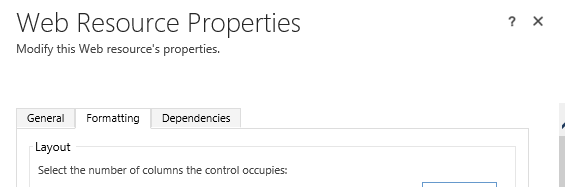
1) Go to Web Resource properties
2) Click on Formatting tab.
3) Scroll down, you will an option for disabling border.
Now, you won't see a border on the form.
Hope this helps.
 
--
Happy CRM'ing
Gopinath

Monday, 12 October 2015

Update Dynamic Property Instance using JavaScript in CRM 2015

Hi,
 
Today we got the requirement to update Dynamic Product Properties of an Opportunity Product using JavaScript.
 
Here is the JavaScript code for doing it.
 
function updateProductProperties() {
   var vUpdateProperty = {};
   vUpdateProperty.ValueString = "testing";
   vUpdateProperty.DynamicPropertyId = { Id: "", LogicalName: "dynamicproperty" };
   vUpdateProperty.RegardingObjectId = { Id: "", LogicalName: "opportunityproduct" };
   var vdynamicProductPropertyId = "<DynamicPropertyInstanceGUID>";
   SDK.REST.updateRecord(vdynamicProductPropertyId, vUpdateProperty, "DynamicPropertyInstance", function () { alert("The dynamic property instance record changes were saved"); }, function (error) { alert(error.message); });
}

Refer this link for Updating Product Properties using C#

Hope this helps.
 
--
Happy CRM'ing
Gopinath

Tuesday, 29 September 2015

FormType (Create and Update) based Business Rules in CRM 2015

Hi,

Today I was writing some JavaScript to hide some of the controls and got a doubt that whether we can do the same using Business Rules.

The answer is Yes, we can do. Just check the condition CreatedOn contains data and write your actions.

Note: Make sure you have added CreatedOn field on the form. If you are not using it, hide it form the form. Business rule requires the field to be there on the form.

Hope this helps.

--
Happy CRM'ing
Gopinath

Sunday, 13 September 2015

Plugin/Workflow to Validate Business Process Flow in CRM 2015

Hi,

Most of the times we get requirement to validate the user on clicking Next stage or previous stage. This can be easily done by workflow.

1) Just create a real time workflow by following the below steps.
2) Select Process Stage (StageId) from Record Field Changes
3) Check the condition from Process Stage, add your conditions here along with the stage you wanted to validate.
4) Stop the workflow with the message.

Output

In my requirement, I wanted to validate some with the current stage and previous stage. Normally for this type of things we go with Plugin by adding a pre-image.

I tried the same to register the plugin, unfortunately the plugin registration tool is not showing any fields that are related to Process
to select in the Filtered Attributes.
However, we have a fix for this.

1) Use Developer toolkit for creating a plugin and registering.
2) Register the plugin on update and select any field whichever you want. I did select 'name' in this example.
 
3) The toolkit prepares Register XAML for you. Now, go ahead and change the field name to stageid and deploy the solution.
4) In the same way, you can also register PreImage and PostImage.

Here is my code in the plugin.

Output

Note: Currently this is working only Online CRM and working on OnPremise with issues like Business Process Flow shows two active stages, after validating users are not allowed to modify anything until they refresh the page etc..

We will have wait for Ara release to get the issue fix. Will update this post soon.

Hope this helps.
--
Happy CRM'ing

Gopinath
 

Tuesday, 25 August 2015

Update Dynamic Property Instance(Properties of QuoteProduct/OrderProduct/InvoiceProduct) in CRM 2015

Hi,

We all know that Product Properties is the new features in CRM 2015.

Internally, these records are created in the DynamicPropertyInstance Table.  There are two ways of updating these records.

1) Using Native Update Request.
2) Using UpdateProductProperties Message which expects EntityCollection as input.

The only we need to know is which field to update. Most of you will be surprised why I said which field to update. In this table, the data is update according to the type of the property.

When we add a property to the family, we select the type of the property like Single line of text, Whole Number, Decimal Number etc. And internally CRM has individual columns for each type like ValueString, ValueDecimal, ValueInteger etc.

Even we have DynamicPropertyInstanceId, the challenge is to know the field name to update.

For that thing, we can use RetrieveProductProperty Message which expects input of OrderProduct/QuoteProduct/InvoiceProduct GUID and returns the base property details of the Product. By this, we can determine the type of the property and then use the same to update.


public void UpdateDynamicProductProperty(IOrganizationService iService)
{
     // Get the base product properties.
     RetrieveProductPropertiesRequest objRequest = new RetrieveProductPropertiesRequest();
     objRequest.ParentObject = new EntityReference("salesorderdetail", new Guid(""));
     RetrieveProductPropertiesResponse obj = (RetrieveProductPropertiesResponse)iService.Execute(objRequest);
     EntityCollection entCol = obj.EntityCollection;

     // Retrieve the Properties of the SalesOrderProudct.
     QueryExpression objQueryExp = new QueryExpression();
     objQueryExp.EntityName = "dynamicpropertyinstance";
     objQueryExp.Criteria.AddCondition(new ConditionExpression("regardingobjectid", ConditionOperator.Equal, "CDF9CA4C-B53A-E511-80CE-000D3AA023B6"));
     objQueryExp.ColumnSet = new ColumnSet(true);
     EntityCollection entColDynamicProperties = iService.RetrieveMultiple(objQueryExp);

     // Get the Field name to update.
     EntityReference erfDynamicProperty = (EntityReference)entColDynamicProperties.Entities[0]["dynamicpropertyid"];
     string strAttributeName = GetDynamicPropertyDataType(erfDynamicProperty.Id, entCol);

     // Update the Value of the Dynamice Property Instance.
     Entity entProductProperty = entColDynamicProperties.Entities[0];
     entProductProperty.Attributes[strAttributeName] = "ABCD";
     iService.Update(entProductProperty);
}

private static string GetDynamicPropertyDataType(Guid guidDynamicProperty, EntityCollection entCol)
{
   var entity = entCol.Entities.Single(e => e.Id ==  guidDynamicProperty);
   string strAttributeName = string.Empty;
   if (entity.Contains("datatype"))
   {
        OptionSetValue opsDataType = (OptionSetValue)entity.Attributes["datatype"];
        switch (opsDataType.Value)
        {
            case 3:
               return "valuestring";
            case 4:
               return "valueinteger";
            default:
               return string.Empty;
         }
    }
    return string.Empty;
}

We can also use UpdateProductProperties Request in the same way,  but the request needs entitycollection as an input and updates the properties.

UpdateProductPropertiesRequest objUpdateProductPropertiesReq = new UpdateProductPropertiesRequest();
objUpdateProductPropertiesReq.PropertyInstanceList = entColProperties;
objUpdateProductPropertiesReq.PropertyInstanceList.EntityName = "dynamicpropertyinstance";
var vResponse = iService.Execute(objUpdateProductPropertiesReq);

Hope this helps.

--
Happy CRM'ing
Gopinath