Hi Everyone,
Here are the steps to download Dynamics 365 CE Plugin Registration Tool via PowerShell.
1) Type Windows Powershell in windows start menu and open it.
2) Navigate to the folder where you would like download the tool.
3) Copy and paste the following PowerShell script into the PowerShell window and press Enter.
2) Navigate to the folder where you would like download the tool.

3) Copy and paste the following PowerShell script into the PowerShell window and press Enter.
[Net.ServicePointManager]::SecurityProtocol =
[Net.SecurityProtocolType]::Tls12
$sourceNugetExe = "https://dist.nuget.org/win-x86-commandline/latest/nuget.exe"
$targetNugetExe = ".\nuget.exe"
Remove-Item .\Tools -Force -Recurse -ErrorAction Ignore
##
##Download Plugin Registration Tool
##
./nuget install Microsoft.CrmSdk.XrmTooling.PluginRegistrationTool -O .\Tools
$prtFolder = Get-ChildItem ./Tools | Where-Object {$_.Name -match 'Microsoft.CrmSdk.XrmTooling.PluginRegistrationTool.'}
Remove-Item .\Tools\$prtFolder -Force -Recurse
$sourceNugetExe = "https://dist.nuget.org/win-x86-commandline/latest/nuget.exe"
$targetNugetExe = ".\nuget.exe"
Remove-Item .\Tools -Force -Recurse -ErrorAction Ignore
##Download Plugin Registration Tool
##
./nuget install Microsoft.CrmSdk.XrmTooling.PluginRegistrationTool -O .\Tools
$prtFolder = Get-ChildItem ./Tools | Where-Object {$_.Name -match 'Microsoft.CrmSdk.XrmTooling.PluginRegistrationTool.'}
Remove-Item .\Tools\$prtFolder -Force -Recurse


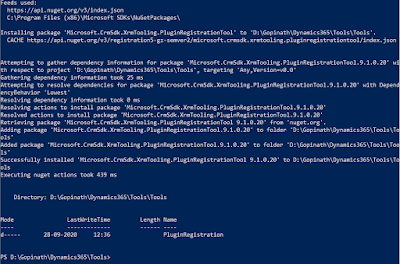
4) You will see the Tool at the given path.

Hope this helps.
--
Happy 365'ing
Gopinath.
Happy 365'ing
Gopinath.


