Showing posts with label Dynamics 365 CE. Show all posts

Tuesday, 29 September 2020

Sign in required popup - Make.PowerApps.com

 Hi Everyone,

Today, I was trying to logic to Make.PowerApps.com and I was getting a popup as below. The reason could be, if you have logged on with two or more user accounts to different Dynamics 365 systems, you might get this issue. 

Clearing browser cache helped me to get rid of the issue.

Hope this helps.

--
Happy 365'ing
Gopinath.

Monday, 28 September 2020

Get User Privilege on a field - Dynamics 365 CE

 Hi Everyone,

Today I got a requirement to check whether the user has access to read the data on the field where field level security has been enabled and do some operations.

We can achieve this using getUserPrivilege() client API.

var fieldPrivileges = formContext.getAttribute("new_fieldsecurityfield").getUserPrivilege();

Result when user doesn't have permission.

Result when user have permission.

Hope this helps.

--
Happy 365'ing
Gopinath.

Download Plugin Registration Tool using PowerShell - Dynamics 365 CE

Hi Everyone,

Here are the steps to download Dynamics 365 CE Plugin Registration Tool via PowerShell.

1) Type Windows Powershell in windows start menu and open it.
2) Navigate to the folder where you would like download the tool.

3) Copy and paste the following PowerShell script into the PowerShell window and press Enter.
[Net.ServicePointManager]::SecurityProtocol = [Net.SecurityProtocolType]::Tls12
$sourceNugetExe = "https://dist.nuget.org/win-x86-commandline/latest/nuget.exe"
$targetNugetExe = ".\nuget.exe"
Remove-Item .\Tools -Force -Recurse -ErrorAction Ignore
Invoke-WebRequest $sourceNugetExe -OutFile $targetNugetExe
Set-Alias nuget $targetNugetExe -Scope Global -Verbose
 
##
##Download Plugin Registration Tool
##
./nuget install Microsoft.CrmSdk.XrmTooling.PluginRegistrationTool -O .\Tools
md .\Tools\PluginRegistration
$prtFolder = Get-ChildItem ./Tools | Where-Object {$_.Name -match 'Microsoft.CrmSdk.XrmTooling.PluginRegistrationTool.'}
move .\Tools\$prtFolder\tools\*.* .\Tools\PluginRegistration
Remove-Item .\Tools\$prtFolder -Force -Recurse

4) You will see the Tool at the given path.

Hope this helps.

--
Happy 365'ing
Gopinath.

Sunday, 27 September 2020

Get Api Version in JavaScript for WebApi Requests - Dynamics 365 CE

Hi Everyone,

Today I was reviewing the code that was written an year ago and in most of the places I have seen the code like below.

req.open("GET", Xrm.Page.context.getClientUrl() + "/api/data/v9.1/accounts(3851da21-5ae9-ea11-a817-000d3a5308e0)?$select=accountid,accountnumber,name", true);

If you observe that Version has been hard corded in the request, even though it works perfectly I would say, we can do the same in much more better way by taking  it dynamically.

Here is the way for the same.

    var apiVersion = Xrm.Utility.getGlobalContext().getVersion();
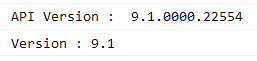
    console.log("API Version :  " + apiVersion);
    var version = apiVersion.substring(3, apiVersion.indexOf(".") - 1);
    console.log("Version : " + version);
 
    req.open("GET", Xrm.Page.context.getClientUrl() + "/api/data/v" + version + "/accounts(3851da21-5ae9-ea11-a817-000d3a5308e0)?$select=accountid,accountnumber,name", true);

Hope this helps.
--
Happy 365'ing
Gopinath. 

Object reference not set to an instance of an object – error in Dynamics 365 Plugin Registration Tool

Hi Everyone,

Today I was working on some plugin work  and was On-Premise system and when I try click on Register new assembly via Plugin Registration Tool, I was getting "Object reference not set to an instance of an object" error.

If it was my machine, I could have downloaded XRMToolBox or latest Plugin Registration tool but I was working on the server and don't have any permissions to download the required. I was completely stuck with it and don't even know what to do. 

After quick search, came to know that clearing contents in Appdata would solve the issue.

Navigated to "C:\Users\<UserName>\AppData\Roaming\Microsoft\PluginRegistration" and deleted all the contents and then Plugin Registration started working normally.

Hope this helps.

--
Happy 365'ing
Gopinath.

Friday, 25 September 2020

Configure Model Driven App Access to the Users - Dynamics 365 CE

 Hi Everyone,

In this post, we will go through the steps that are required for the users to get Access on the required apps.

Many times we get requirement to create a new Model-Driven App and when it is created System Administrator and Customizer have access on the app by default. For the other users, we have to give right access to get the App.

The first thing that is needed to get App access is Read Privilege on Model Driven App under Customization tab of the Security Role.

Next thing, you need to give the permission on App. This Apps specific, if there are 10 Apps in the system, we might want to give permission to only 2 App to the User. 

For this, Navigate to Settings -->Application --> Apps

Select the App which you wanted to give permission and click on ellipse (...) --> Manage Roles.

Select the roles for which you would like to give access and Save.

Hope this helps.

--
Happy 365'ing
Gopinath.

Customer Service Workspace App - Dynamics 365 CE 2020 Wave 2 Release

Hi Everyone,

Today I was exploring new features that were released in 2020 Release Wave 2 and found a new App named as Customer Service Workspace has been released.

This seems to be a game changer for Service Agents which gives Multiple Tabs and Session on UCI App itself.

Make sure you enable 2020 Release Wave 2 of Dynamics 365 CE to get this App.

Click on + button to open the Tabs

Click on any link (Record link, New Email, New Task etc.. ) by pressing Shift on keyboard to open a new session

By default we can have maximum of 10 Tabs and 9 Sessions in the current app. Couldn't find any configuration to change, please share it if you find it anywhere.

There are new forms added on Account, Contact and Case for multi session experience. 

Hope this helps.

--
Happy 365'ing
Gopinath

Thursday, 24 September 2020

Hide Formselector on the Form - Dynamics 365 CE/CRM

 Hi Everyone,

Today I got a requirement to hide FormSelector on the Form as Users would have access to multiple forms but we have to navigate them to right form based on a field value on the record and we shouldn't give an option to change the form to the User. 

My initial thought was it's not possible to hide formselector but one of my colleagues came up with the below piece of the code and it worked like a charm.

Logic is simple, set Visibility of the forms to False.

 var formContext = executionContext.getFormContext();
    formContext.ui.formSelector.items.get().forEach(function (item, index) {
        // hide all the form apart from Opportunity.
        if (item.getLabel() != "Opportunity") {
            item.setVisible(false);
        }
    });

Without above code, we see formselector

With code, we don't see formselector.

Hope this helps.

--
Happy 365'ing
Gopinath

Retrieve Optionset Metadata using JavaScript - Dynamics 365 CE/Microsoft Dynamics CRM

Hi Everyone,

Today I got a requirement to retrieve Optionset Metadata using JavaScript.

Here is the code for the same.

function getOptionSetMetadata(schemaName) {
    var schemaName = "industrycode"; // You can pass this as a parameter to this function and comment this line.
     var optionSetFetch = `<fetch version='1.0' output-format='xml-platform' mapping='logical' distinct='false'>
        <entity name='stringmap' >
            <attribute name='attributevalue' />
            <attribute name='value' />
            <filter type='and' >
                <condition attribute='attributename' operator='eq' value= '${schemaName}' />
            </filter>
        </entity>
    </fetch>`;
    optionSetFetch = "?fetchXml=" + encodeURIComponent(optionSetFetch);
 
    Xrm.WebApi.retrieveMultipleRecords("stringmap", optionSetFetch).then(
        function success(result) {
            if (result.entities.length > 0) {
                console.log(result.entities);
                for (count = 0; count < result.entities.length; count++) {
                    console.log("Attribute Value : " + result.entities[count].attributevalue);
                    console.log("Value : " + result.entities[count].value);
                }
            }
        },
        function (error) {
            console.log(error.message);
        });
}

Here is the output.

Hope this helps.

--
Happy 365'ing
Gopinath.

Tuesday, 22 September 2020

Where is Breadcrumb navigation in Dynamics 365 CE - 2020 Release Wave 2?

Hi Everyone,

Today I have updated my trail instance to 2020 Release Wave 2 and navigating here and there to understand the changes. I was so used to click on Breadcrumb in the top navigation as shown below and I couldn't see the same after enabling 2020 Release Wave 2. 

Yes, that's right. Breadcrumb navigation is gone now and there is a new button added on the Ribbon.

Hope this helps.

--
Happy 365'ing
Gopinath.

Timeline Control Features in Dynamics 365 CE - 2020 Wave 2 Release

Hi Everyone, 

Today I was going through the new features of Dynamics 365 CE 2020 Wave 2 Release and it seems we have good improvements on Timeline Control.

  • Expand the timeline records by default. 
  • Hide “What you’ve missed.” 
  • Show email as Conversation or as individual messages. 
  • Hide status.

Expand the timeline records by default  - This would give visibility of full content by default. This can be done by default by changing the Timeline Configuration on the Form.

Hide "What you've missed"  - Dynamics 365 will record the time you last accessed the record.  A new summary (filter) allows you to see the recorded Activities/Posts/Notes since that date and time. The setting is disabled by default. When enabled, a notification is displayed as shown in the below screenshot.

Show email as Conversation or as individual messages  - This is an option on the Timeline itself to show emails as full conversations or individual messages.

Show/Hide status  - We can show/hide status of the Activities on Timeline Control and this setting is maintained at Entity level on Timeline. 

Hope this helps.

--
Happy 365'ing
Gopinath.

Monday, 21 September 2020

Advanced Find Icon missing - Dynamics 365 UCI Online

Hi Everyone,

Today I was working on Dynamics 365 CE UCI online version and noticed that Advanced Find button is missing. 

I am sure that we don't have any control on those button via Custom code or configurations. Thought of raising a support ticket with Microsoft and before doing that, did a quick search and came to know that someone has disabled the setting in System Settings.

I don't even know that there is a setting for this :)

Advanced Settings --> Administration --> System Settings --> General Tab --> Enable embedding of certain legacy dialogs in Unified Interface browser client  --> Change the setting to Yes

By default, the setting "Enable embedding of certain legacy dialogs in Unified Interface browser client" is set to Yes.

The button is back after changing the setting to Yes.
Hope this helps.

--
Happy 365'ing
Gopinath.

Saturday, 19 September 2020

Microsoft.Crm.CrmException: Webresource content size is too big

Hi Everyone,

Today, I have received an error saying "Webresource content is too big" when I was importing PCF solution to one of our instances.

The fix is simple, the solution size which I was importing was more than 5 MB and the max file size limit for attachments was 5,120 (5 MB) in the instance. Updating the value to 10 MB (10,240) fixed the issue.

Settings --> Administration -->System Settings--> Email tab
Hope this helps.

--
Happy 365'ing
Gopinath.

Sunday, 30 August 2020

Programmatically Recalculating Rollup fields using C# in Dynamics 365/CRM

Hi Everyone,

Today I got an requirement to send some data to external system and they were looking for real time data. When I did the fields found some Rollup fields and we all know that Rollup fields are asynchronous in nature and it is managed by Recurring System Jobs.

I was kind of stuck, did a little search and understood that there is a SDK message which we can use for recalculating. Here is the code for the same.


CalculateRollupFieldRequest rollupRequest = new CalculateRollupFieldRequest
            {
                Target = new EntityReference("account", new Guid("475b158c-541c-e511-80d3-3863bb347ba8")),
                FieldName = "new_rollupfromchild"
            };


CalculateRollupFieldResponse response = CalculateRollupFieldResponse)crmService.Execute(rollupRequest);

Hope this helps.

--
Happy 365'ing
Gopinath.

List Records Output not showing in Power Automate/Microsoft Flow

Hi Everyone,

Today I have configured a CDS List Records step in flow to retrieve some records and I have to parse them and do some operation. We all know that for Parse JSON step, we have to give schema. In these type of cases, usually we run the flow first till List Records step and copy the output from that step and give copied output to generate schema in Parse JSON step.

When I was doing the same, unfortunately the list records steps is not showing output and not giving any option to download the result as well. I was kind of stuck with that and by doing quick search came to know that we can Compose Step  give the output the List Records step to Compose step so that we can see the result and use it for generating schema.


Hope this helps

--
Happy 365'ing
Gopinath

Get a single/first record from CDS/Dynamics 365 List Records action step in Power Automate/Microsoft Flow


Hi Everyone,

Today I was working on Microsoft Flow and I have List Records step configured in the flow. As per the requirement, I know that the result of the List Records step would be one record or empty. We all know that to get the data from List Record, normally go with Apply to each step as I already know that the output count of records would not be more than 1 taken below approach.

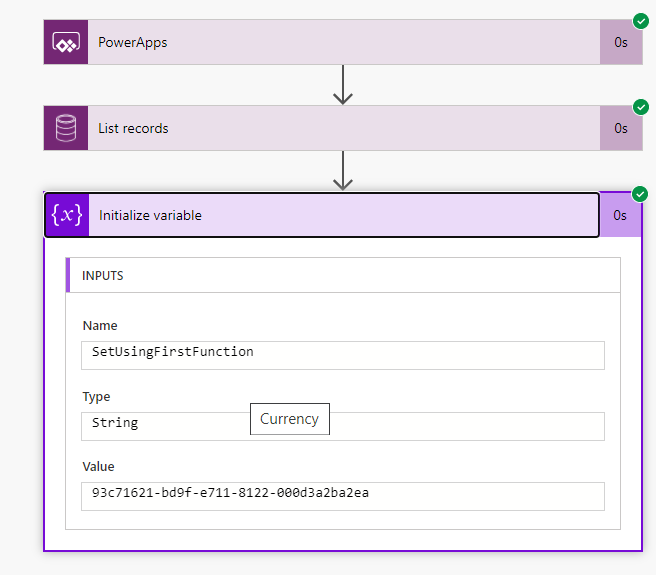
List Records Step  -->  Take the required values using First function.

first(body('List_records')?['value'])?['accountid']

This returns empty string if the count is 0 else the value.


Hope this helps

--
Happy 365'ing
Gopinath

Saturday, 15 August 2020

Open the required App in much more easier and faster - Dynamics 365 CE 2020 Release Wave 2

Hi Everyone,

Today I was exploring the latest features on the Dynamics 365 CE 2020 Release Wave 2 and I have opened Sales Hub, after sometime I would like to open Customer Service Hub and to my surprise I was not able to find the Icon (check the below screenshot) that used to show the Apps in the system.

After some search, it was replaced with the Hyperlink on the App Names itself.


Hope this helps.

--
Happy 365'ing
Gopinath.

Friday, 14 August 2020

Get InitialValue of a field in JavaScript - in Dynamics 365 CE

Hi Everyone,

Today I was going through Client API from Microsoft Docs and found getInitialValue reference. I haven't used it anytime and explored little bit. 

Many times we get the requirement to compare the field values on the Save with the values that were populated on the load and to achieve this, normally we use declare a global variable in JavaScript and set the variable to the value of the field on the Load event and use it on Save for comparing. We can say good bye to these kind of logics and use getInitialValue() to get the value when the form is opened.

Here is the syntax for the same.

formContext.getAttribute(<attributename>).getInitialValue()

Note: 
1) This method works for only Boolean, OptionSet or MultiSelectOptionSet attributes. 
2) Once the record is saved, getInitialValue holds the latest value whatever that was changed by the user.

Hope this helps.

--
Happy 365'ing
Gopinath.
Thursday, 6 August 2020

Get Security Roles of logged-in/current user in JavaScript - Dynamics 365 CE

Hi Everyone,

Let's say bye bye to all the code that we used to write for getting Security Roles of the logged in User. 

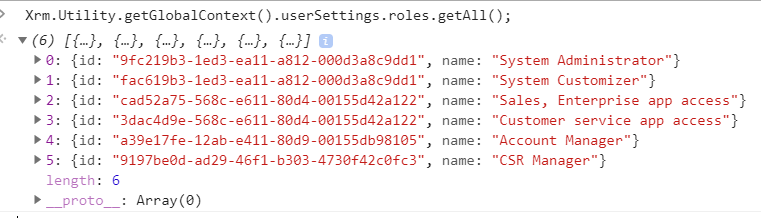
Here is the single line of the JavaScript code which gets all the Security Roles GUIDs along with names.

Xrm.Utility.getGlobalContext().userSettings.roles.getAll();

Security roles associated with the user.

Security roles associated with the Team where user is a part of the Team.


When we run the code, here is the output.


Hope this helps.

--
Happy 365'ing
Gopinath.

Wednesday, 5 August 2020

Enable 2020 Release Wave 2 – Dynamics 365

Hi Everyone,

Release Wave 2 Early access has been released and here are the steps to enable it on your instance

Logon to Admin Portal

Open the environment which you would like to enable Early access and click on Manage.
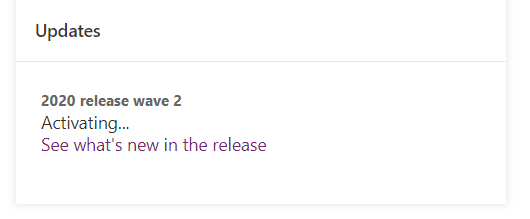
You will see the screen as below and click on Update now for getting Release Wave 2 Features to the instance.

You will be asked to enter Environment's name for the verification.

After verification, the Update process starts and it will take some time.

Hope this helps.

--
Happy 365'ing
Gopinath.